Implement Tanzu on private networks with VyOS
With a virtual router (here VyOS ), and proper routing table, it is possible to implement VMware Tanzu on private networks without NSX-T.
The premise
I needed to evaluate VMware Tanzu basic capabilities with CSI driver for PowerScale .
As a prerequisite, Tanzu needs two networks at least:
- Management cluster (Supervisor cluster)
- Workload cluster (on-demand clusters)
In my lab, I only have one routable VLAN. For Tanzu, I decided to use three networks:
- Frontend network (
10.247.247.0/24) - routable to external world with Load-Balancer VIP - Management network (
10.0.0.0/24) - for vSphere management - Workload network (
10.0.1.0/24) - to host all Tanzu clusters
The problem: I do not have an NSX-T license. Luckily, Linux is here to save the day.

The implementation
The trick is to use a virtual machine that acts as a router. My choice was VyOS , a Debian-based distro designed for routing.
VyOS will route between connected interfaces, so I just had to configure NAT:
nat {
    source {
        rule 10 {
            outbound-interface eth0
            source {
                address 10.0.0.0/24
            }
            translation {
                address masquerade
            }
        }
        rule 20 {
            outbound-interface eth0
            source {
                address 10.0.1.0/24
            }
            translation {
                address masquerade
            }
        }
    }
}
Ping issue
During workload cluster creation I got an error. The ICMP echo requests went through the router but the response was issued directly on the DSwitch.
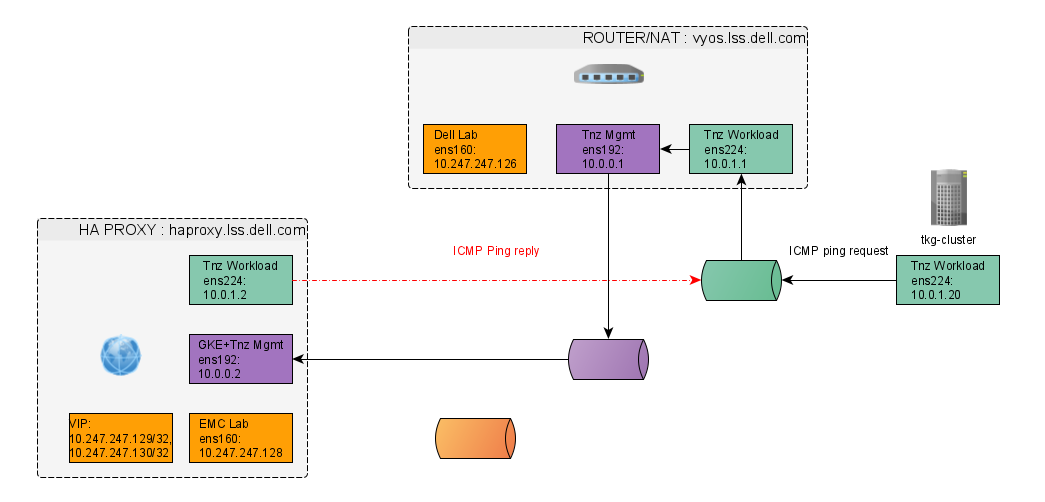
The fix required three network configuration changes on HAProxy:
- Set workload IP with
/32mask in/etc/systemd/network/10-workload.network - Update gateway of Management NIC in
/etc/systemd/network/10-management.network - Add default route for external with higher weight in
/etc/systemd/network/10-frontend.network
Apply changes with systemctl restart systemd-networkd.
DNS
Tanzu nodes need to resolve DNS names of VMs on private networks.
VyOS does not come with DNS service, so I installed dnsmasq on the HAProxy (PhotonOS uses rpm packages: yum install dnsmasq).
The dnsmasq.conf configuration:
interface=eth2
listen-address=10.0.1.1
no-hosts
local=/tanzu.local/
log-queries
Conclusion
For basic features (NAT, static/dynamic routing, DHCP, Firewall, etc.) VyOS is an excellent virtual router that can get you a long way if you don't have NSX-T license .