Use cert-manager with Karavi Observability
Check out how Prometheus metrics & Grafana dashboard work for CSI PowerFlex from this karavi observability video .
Learn more about karavi and karavi-observability from their respective repositories.
The premise
Dell Technologies launched the project Karavi in December 2020 with the objective to complement functionalities not covered by the CSI specification .
Karavi focuses in three domains:
- Observability
- Data mobility
- Security
The first project brought to life as a tech-preview is the metrics & topology collection for PowerFlex Kubernetes volumes.
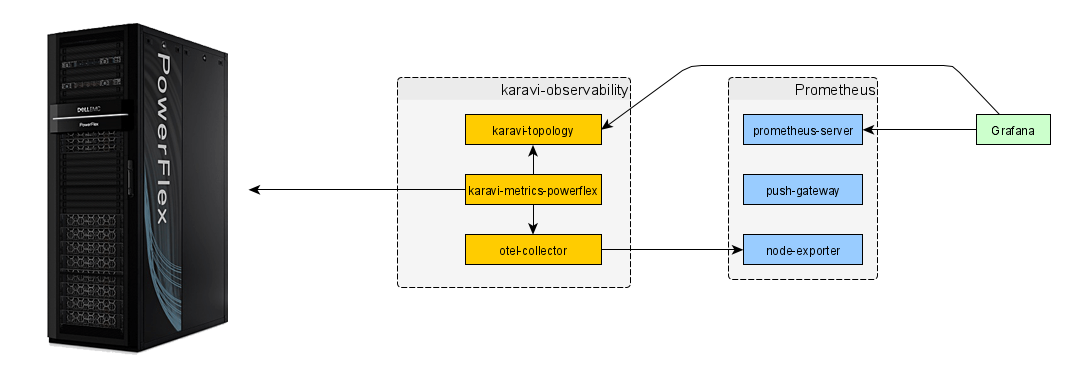
At the time of the publication, the communication between the OpenTelemetry component and Prometheus server, and the communication between the Karavi topology component and Grafana are secured with TLS by default.
As indicated in the documentation, you have to supply certificates to the helm installer.
Using cert-manager
cert-manager is the go-to Kubernetes certificate management tool. It is bundled with some distributions like GKE.
The first step to use certificates delivered by cert-manager is to configure an Issuer. The easiest is to use a SelfSigned:
apiVersion: cert-manager.io/v1
kind: Issuer
metadata:
  name: selfsigned-issuer
  namespace: karavi
spec:
  selfSigned: {}
The next step is to define the parameters for your certificate:
apiVersion: cert-manager.io/v1
kind: Certificate
metadata:
  name: otel-collector-cert
  namespace: karavi
spec:
  secretName: otel-collector-tls
  duration: 2160h # 90d
  renewBefore: 360h # 15d
  subject:
    organizations:
      - karavi
  isCA: false
  privateKey:
    algorithm: RSA
    encoding: PKCS1
    size: 2048
  usages:
    - server auth
  dnsNames:
    - otel-collector
    - otel-collector.karavi.svc
  issuerRef:
    name: selfsigned-issuer
    kind: Issuer
The last step is to patch the deployment to use the new certificate stored as a secret.
Go further
If you want to learn more about Karavi observability, you can check the Dell container community forum.